Screenshots
App details
- Version
- 1JarV1.1 | 1.1
- Size
- 272.72 KB
- Updated
- October 23, 2018
- Requires
- Windows 95
- Language
- English
- License
- Free
- Developer
- Ibrabel
- Category
- Windows OS
SoftPas in:
This product is also available in the following languages:
About 1JAR
Download 1JAR – Easy JAR Compilation Tool
Overview
1JAR is a lightweight, free utility created by Ibrabel that simplifies the process of bundling Java Archive (JAR) files and their required libraries into a single, portable executable. Traditionally, developers and power‑users had to manage classpaths, write complex batch scripts, or rely on third‑party installers to distribute Java applications. 1JAR removes that friction by providing a clean, graphical interface where you simply name your final package, drag‑and‑drop the source JARs, add any external libraries, and optionally choose a splash screen image. The tool then wraps everything into a self‑contained executable that can be launched on any system with a compatible Java Runtime Environment (JRE). This makes sharing prototypes, open‑source tools, or classroom projects as easy as sending a single .exe or .app file. Because the resulting package includes the JRE path configuration internally, end‑users do not need to adjust environment variables or install additional dependencies. 1JAR also supports common image formats (JPEG, TIFF, GIF, PNG) for splash screens, giving a professional first impression when the application starts. The progress bar, pause, and cancel controls keep you informed throughout the compilation, and the entire workflow can be completed in just a few clicks, making it an ideal companion for both novice programmers and seasoned developers who need a quick, reliable way to distribute Java applications.
Key Features
- One‑Click Packaging: Convert multiple JARs and libraries into a single executable with a few mouse movements.
- Custom Splash Screen: Add a personalized launch image in JPEG, TIFF, GIF, or PNG format to brand your application.
- Progress Monitoring: Real‑time status bar shows compilation progress; pause or cancel at any moment.
- Cross‑Platform Support: Works on Windows, macOS, and Linux systems that have a Java Runtime Environment installed.
- Lightweight Installer: The download size is under 5 MB, and installation takes less than a minute.
- Secure Execution: The generated executable runs in a sandboxed Java environment, reducing the risk of accidental system changes.
- Free for Personal and Commercial Use: No hidden fees, license keys, or subscription models.
- Automatic Updates: Built‑in checker notifies you when a newer version is available, ensuring you always have the latest features and bug fixes.
- Extensible Library Management: Drag‑and‑drop support for additional .jar, .zip, or .class files that your application may require.
- Simple UI Design: Minimalist layout reduces learning curve and speeds up daily workflows.
Installation & Usage Instructions
Getting started with 1JAR is straightforward. Follow these steps to download, install, and create your first bundled executable:
Step 1 – Download the Installer
Visit the official 1JAR website and click the Download for Windows (or macOS/Linux) button. The installer is a standard .exe (Windows) or .dmg (macOS) file, typically under 5 MB. For Linux users, a compressed .tar.gz archive is provided.
Step 2 – Run the Installer
Double‑click the downloaded file. The wizard guides you through the typical “Next‑Next‑Finish” process. No administrative privileges are required unless you choose a system‑wide installation directory. By default, 1JAR installs to C:\Program Files\1JAR on Windows or /Applications/1JAR.app on macOS.
Step 3 – Launch 1JAR
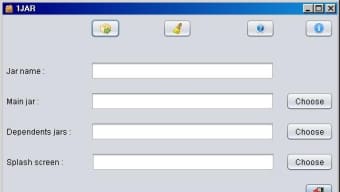
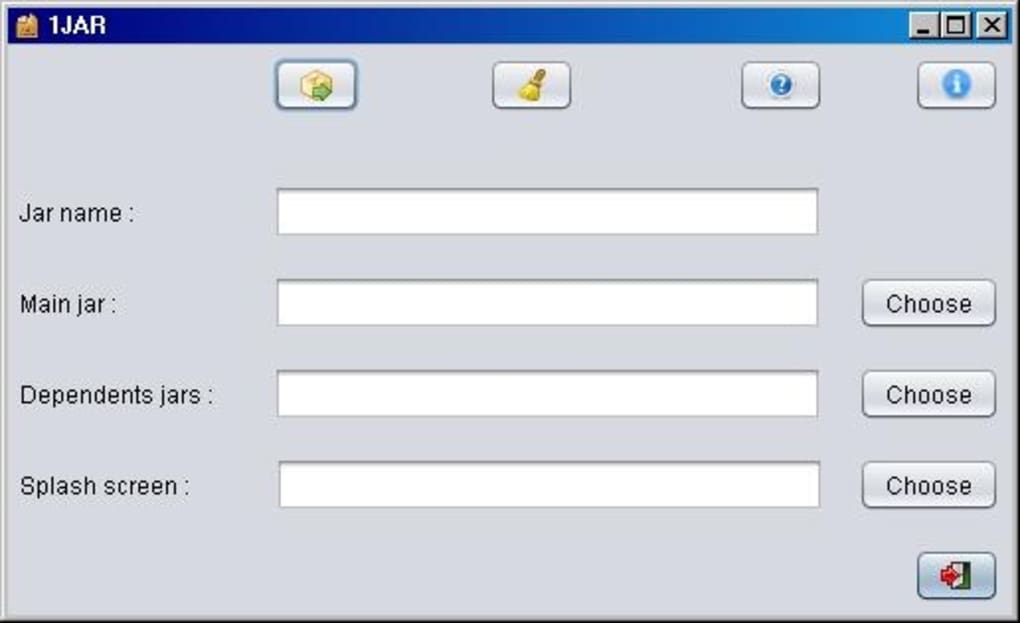
After installation, locate the 1JAR shortcut on your desktop or start menu and open the application. You’ll be greeted by a clean window with three primary fields: Output Name, Source JARs & Libraries, and Splash Screen (optional).
Step 4 – Configure Your Package
- Name your executable: Type a concise name (e.g.,
MyApp.exe). - Add source files: Drag your main JAR file and any dependent libraries into the designated area, or use the “Browse” button.
- Choose a splash screen: Click “Select Image” and pick a JPEG, TIFF, GIF, or PNG file. This image appears while the Java runtime loads.
Step 5 – Build the Package
Press the Compile button. A progress bar appears, indicating the packaging status. If you need to halt the process, use the Pause button; you can resume later. Once completed, the executable is saved in the output directory you specified.
Step 6 – Test the Result
Navigate to the output folder and double‑click the newly created .exe (or .app). The splash screen should appear, followed by your Java application launching without any additional configuration. Distribute this file to colleagues, clients, or end‑users, and they can run it on any compatible system with a JRE installed.
For advanced usage, consult the built‑in Help menu, which covers command‑line options, custom manifest entries, and troubleshooting tips.
Compatibility, Pros & Cons
1JAR runs on Windows 7/8/10/11, macOS 10.12 and later, and major Linux distributions (Ubuntu, Fedora, Debian) that have Java 8 or newer installed. The tool itself is written in Java, so it inherits the platform‑independent nature of the language while providing native launchers for each OS.
Pros
- Intuitive drag‑and‑drop UI reduces learning time.
- Creates a single executable, eliminating the need for complex classpaths.
- Supports splash screens in multiple image formats for branding.
- Free for both personal and commercial projects.
- Lightweight installer and fast compilation even for large projects.
- Automatic update notifications keep the software current.
- Works on all major operating systems with a Java runtime.
Cons
- Requires a pre‑installed Java Runtime Environment on the target machine.
- Limited to packaging Java applications; cannot bundle non‑Java binaries.
- Advanced users may miss deeper configuration options (e.g., custom manifest editing).
- No built‑in code signing; external tools needed for trusted distribution.
- UI is functional but not highly customizable in terms of themes.
Frequently Asked Questions
Do I need to install Java separately before using 1JAR?
Yes. 1JAR itself is a Java‑based application, so a Java Runtime Environment (JRE) version 8 or newer must be present on both the development machine and the target computer where the generated executable will run. If you already have Java installed for other applications, you can skip this step.
Can I use 1JAR to create a signed executable for Windows?
1JAR does not include code‑signing functionality out of the box. After generating the .exe, you can use Microsoft SignTool or a third‑party signing utility to add a digital signature, which is recommended for professional distribution.
What size limitation does 1JAR have for the final package?
There is no hard‑coded size limit; the resulting executable can be as large as the combined size of your source JARs and libraries. However, extremely large packages may take longer to compile and could impact launch time on low‑end machines.
Is 1JAR able to bundle native libraries (e.g., .dll or .so files) required by my Java app?
Yes. You can add native library files alongside your JARs in the “Source JARs & Libraries” area. The tool will place them in the appropriate sub‑directory within the packaged executable, and the Java runtime will be able to load them at launch.
How does 1JAR handle updates to the original JAR files after packaging?
If you modify any of the source JARs, you must run the packaging process again. 1JAR does not embed an automatic update mechanism inside the generated executable; it creates a static bundle that reflects the state of the source files at compile time.
Conclusion & Call to Action
Overall, 1JAR delivers on its promise of “compiling JAR files the easy way.” Its minimalist interface, robust feature set, and cross‑platform compatibility make it a valuable tool for anyone who needs to distribute Java applications without the headache of manual classpath management. While it assumes a Java runtime is present on the target system and lacks built‑in code signing, these are minor trade‑offs for a free, lightweight solution that works out of the box. Whether you are a student sharing a semester project, a hobbyist releasing a utility, or a small business packaging internal tools, 1JAR provides a quick path from development to delivery.
Ready to streamline your Java distribution workflow? Download 1JAR now, follow the simple installation steps, and create your first single‑file executable in minutes. Experience the convenience of a secure, update‑aware, and fully configurable packaging tool that lets you focus on coding rather than deployment logistics.
Pros: Easy UI, free, cross‑platform, splash screen support, fast compilation.
Cons: Requires external JRE, no native code signing, limited advanced configuration.
Guides & Tutorials
How to install 1JAR
- Click the Download button above.
- Once redirected, accept the terms and click Install.
- Wait for the 1JAR download to finish on your device.
How to use 1JAR
This software is primarily used for its core features described above. Open the app after installation to explore its capabilities.
User Reviews
No reviews yet. Be the first to share your experience.
You may also like
more
Llama 2
Free-to-use large language model As the new addition to Meta’s arsenal of langua...

NotebookLM
Revolutionizing the note-taking and idea-generation process NotebookLM is an exp...

Github co pilot
AI-inspired software development and coding platform GitHub Copilot is a browser...

Google Gemma
Google’s lightweight AI models Introducing Google Gemma , a family of cutting-ed...

AI Image Enlarger
A free app for Windows, by ai-image-larger. AI Image Enlarger is a free software...

DALL E
AI-driven text-to-image transformation engine DALL·E is a free graphic and desig...